Model Execution
Understand simulation time, sample periods, execution order, feedback, and communication between rates.
A model’s behavior depends on its calculations and when they execute. Modeloop uses discrete execution instants to evaluate diagrams, update state, and exchange signals. This page describes how timing and data dependencies determine the results.
Callbacks and tasks
A callback is an executable part of a model. Its settings define a periodic execution interval or an event activation condition. A task is a scheduling unit in the build configuration that groups callbacks for execution. A task can include callbacks from different models.
Periodic callbacks with the same period are grouped into a periodic task. The build configuration specifies their execution order. Callback diagrams define the calculations; tasks organize their execution. See Callback for creating and configuring one.
Simulation time and sample periods
Simulation time advances by a constant interval called the base step. A base step of 1 ms creates execution instants at 0 ms, 1 ms, 2 ms, and so on.
The sample period determines how often a periodic callback executes. A callback with a 5 ms period executes every fifth instant on a 1 ms grid. Its outputs retain their values between executions.
The base step must divide every periodic callback’s period exactly. For example, a 2 ms step supports periods of 4 ms and 10 ms, but not 5 ms. Modeloop reports incompatible timing before starting the simulation.
For a flat model in interactive simulation, the simulation step also determines its execution period. Explicit callback periods retain their configured values. Timing uses microsecond resolution.
Simulation time describes the modeled sequence of events. The elapsed time needed to calculate a run depends on the host computer. A simulated period does not establish a deadline guarantee on deployed hardware.
At each simulation instant
Before execution starts, the model is initialized using its configured initial conditions. During a run, each simulation instant follows this sequence.
- Evaluate scenario inputs at the current simulation time.
- Execute due periodic callbacks and eligible event callbacks in their configured order.
- Record selected signals, retaining the previous values for outputs that have not updated.
- Advance simulation time by the base step.
The model’s testing harness supplies the scenarios. See Simulation for run configuration and recorded results.
Execution order within a diagram
Connections define the dependencies between calculations. When an output depends on a current input, its producer must supply that value before the consuming calculation can use it. Modeloop derives this order from the diagram. Moving a block on the canvas does not change its execution order.
This distinction is described by direct feedthrough. Unit Delay, for example, provides a value from its preceding execution and can supply its current output independently of its current input.
Conditional diagrams execute the selected branch. State charts execute according to their active state configuration. Blocks in inactive behavior do not execute merely because a simulation instant has occurred.
Memory and feedback
State carries information between executions. Initial conditions determine the starting values, and each block defines how its state affects subsequent outputs.
A closed path with direct feedthrough throughout forms an algebraic loop. Modeloop rejects such a dependency rather than solving simultaneous algebraic equations.
A Unit Delay can express feedback through a previous value. Adding it changes the algorithm from an instantaneous relationship to a recurrence, so use it when that delay belongs to the design. Having state alone does not remove direct feedthrough. Consult the block’s behavior when designing feedback.
Multiple execution rates
Periodic callbacks can use different sample periods on the same simulation grid. In this example, a 1 ms base step supports three rates. All three callbacks first execute at the simulation start time.
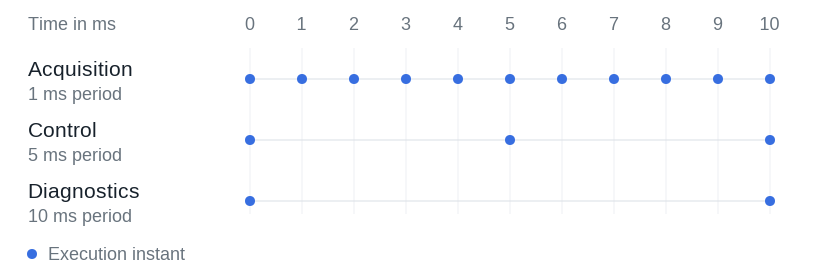
When several callbacks are due at the same instant, the scheduling order determines which executes first. Configure this order in the build settings and review it when changing data dependencies between callbacks.
Communication between rates
A consumer reads the latest value published before its execution. The producer’s output remains available until the producer publishes another value.
At an instant shared by Acquisition and Control, placing Acquisition first lets Control use the newly acquired value. Reversing the order makes Control use the previously retained value, which is the initial value if Acquisition has not yet executed. Execution order therefore affects the age of the data.
A slow consumer observes the latest available sample rather than every intermediate update from a faster producer. Include filtering or other rate conversion in the model when the algorithm requires it.
Event activation
An event callback uses a scalar Boolean activation signal. Its trigger setting determines when it becomes eligible to execute.
| Trigger | Activation condition |
|---|---|
| Rising | A change from false to true |
| Falling | A change from true to false |
| Either | A change in either direction |
| Positive | The signal is true when the callback is visited |
Rising is the default. A signal that remains true does not produce additional rising edges. In Positive mode, it permits execution on each scheduler visit while it remains true. Outputs retain their values between activations.
In fixed step simulation, scenario changes are observed on the simulation grid. Choose a base step that can represent the input transitions relevant to the test.
Hierarchy and timing
A Container groups a nested diagram without introducing a separate sample period. Its contents execute within the owning activation. Conditional diagrams and state charts determine which nested behavior is active.
Use callbacks to assign independent periods or event activation, and Containers to organize calculations. See Model Hierarchy for these modeling elements.
Simulation and generated code
When integrating generated code, preserve the model’s initialization, activation conditions, sample periods, execution order, and signal exchange rules. Target execution time and deadline compliance require validation on the chosen platform.
For comparisons between simulation and generated execution, keep inputs, initial conditions, timing, and numeric settings consistent. See Testing for checking expected behavior.
Further reading
Benveniste and Berry, The Synchronous Approach to Reactive and Real-Time Systems develops the distinction between logical synchronization and physical execution time.
Lohstroh, Lee, Edwards, and Broman, Logical Time for Reactive Software discusses time as part of program behavior and its role in deterministic reactive systems.